

A marketplace is not a shop. Shops sell your own products; marketplaces let many independent vendors sell theirs while you earn a commission on every single order. The best marketplace WordPress themes are built around that difference: vendor stores, frontend dashboards, commission-friendly checkout, and catalogs that stay usable with thousands of products from dozens of sellers.
We build WordPress themes at ScintillaWP, and we verified every pick below on WordPress.org and ThemeForest in July 2026. All ten are marketplace-specific themes designed for multi-vendor plugins like Dokan, WCFM, and WC Vendors. Each entry gives you the USP, price, and the kind of marketplace it fits best.
Key Takeaways
- Martfury dominates the niche with 15,100+ sales and support for every major multi-vendor plugin.
- The vendor plugin is the real platform. Choose Dokan, WCFM, or WC Vendors first, then a theme built for it.
- Digital and physical marketplaces need different themes: Mayosis covers downloads, the rest cover products.
What Makes a Good Marketplace WordPress Theme?
A good marketplace theme includes vendor store pages with branding, frontend vendor dashboards, deep integration with multi-vendor plugins, mega menus and layered filters for large catalogs, and fast Ajax search. Performance is critical, because marketplaces carry far more products and images than single-brand shops.
Before comparing wordpress themes for marketplace projects, pick your vendor engine. Dokan, WCFM Marketplace, WC Vendors, and MultiVendorX handle registration, commissions, and payouts. Every premium theme below supports at least two of them, so switching engines later stays possible without a redesign.
Best Free Marketplace WordPress Themes
All five free picks below come from the official WordPress.org directory and pair with the free versions of Dokan or WCFM to make a working multi-vendor site at zero cost.
1. Shopwell
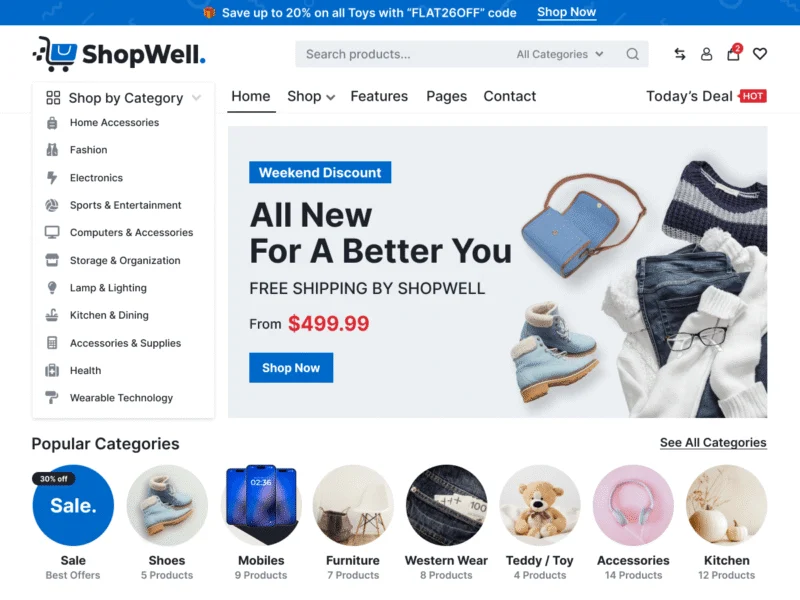
Shopwell (1,000+ installs) is the strongest free base for a marketplace. It is a modern WooCommerce theme with marketplace-style navigation, product layouts, and compatibility with popular multi-vendor plugins.
The design feels closer to premium e-commerce themes than most free options offer. Pair it with free Dokan and you have a real multi-vendor pilot running without spending anything on software.
USP: Premium-feel free base for a Dokan marketplace pilot. Price: Free.
2. Marketplace Shop

Marketplace Shop (300+ installs) is named for the job: a WooCommerce layout with category blocks, deal sections, and a busy retail homepage that suits many vendors selling many products side by side.
Customizer options keep setup simple, and a pro upgrade exists for when the catalog grows. A solid free starting point for a general goods marketplace serving a local market.
USP: Retail-style marketplace homepage with quick setup. Price: Free.
3. Multivendor Marketplace

Multivendor Marketplace (200+ installs) is built specifically for vendor plugins, with store listings and product grids arranged for a many-seller catalog from the very first day.
Its focus is the appeal: no repurposing a generic shop theme, because the multi-vendor structure is the starting point. Good for testing vendor onboarding flows cheaply before committing to premium.
USP: Purpose-built free multi-vendor structure, not a converted shop. Price: Free.
4. Bosa Marketplace

Bosa Marketplace (100+ installs) comes from the large Bosa framework family, which means demo import, steady updates, and a mature options panel behind the marketplace demo.
Choose it if you value an actively maintained parent framework and a clean upgrade path to the Bosa pro tier once commissions start flowing through the platform.
USP: Maintained framework with one-click marketplace demo import. Price: Free.
5. Blockskit Marketplace

Blockskit Marketplace (90+ installs) is the full site editing option: the whole marketplace layout builds from block patterns in the core editor, keeping pages very light.
Speed matters double on marketplaces, where catalog pages carry dozens of product images at once. The block-first build gives this one the best performance floor among the free five listed here.
USP: Full site editing marketplace, the lightest free build here. Price: Free.
Best Premium Marketplace Themes on ThemeForest
These five lead the marketplace results on ThemeForest by sales among actively updated themes, verified in July 2026.
6. Martfury ($59)

Martfury by drfuri is the undisputed marketplace king: 15,100+ sales, 568 ratings, and an update as recent as July 2026. It supports Dokan, WC Vendors, WCFM, and MultiVendorX, so you are never locked to one vendor plugin.
Electronics-style demos, Ajax search, and mobile-optimized catalogs make it the safe default for an Amazon-style general marketplace. Nine years of continuous updates and a huge user community back the choice.
USP: The best-selling marketplace theme, compatible with every major vendor plugin.
7. Marketo ($59)

Marketo by XpeedStudio (5,600+ sales, 199 ratings) ships 15+ niche homepage styles, so a grocery, fashion, or electronics marketplace starts from a matching design instead of a generic one.
It is the strong pick when your marketplace has a clear vertical and you want the design to say so the moment a buyer or vendor arrives on the homepage.
USP: 15+ niche marketplace demos for vertical-focused platforms.
8. Wolmart ($79)

Wolmart by don-themes (3,200+ sales, 167 ratings, updated June 2026) is a Walmart-style marketplace design with Dokan and WCFM compatibility and heavy mobile optimization.
Catalog-dense pages, mega menus, and deal blocks make it fit large general marketplaces where most buyers arrive on phones and expect app-like browsing speed.
USP: Big-box marketplace design tuned for mobile-heavy traffic.
9. Motta ($59)

Motta by uixthemes (2,300+ sales, 76 ratings, updated June 2026) is the modern-design pick: clean cards, refined typography, and full Dokan and WCFM Marketplace support built on Elementor.
Where Martfury and Wolmart feel like big-box retail, Motta feels like a contemporary brand. Choose it for curated or premium marketplaces where design signals quality.
USP: The most modern marketplace design for curated platforms.
10. Mayosis ($69)

Mayosis by TeconceTheme (2,200+ sales, 160 ratings, updated June 2026) is the digital marketplace specialist, supporting both Easy Digital Downloads and WooCommerce for selling files, graphics, templates, and courses from many creators.
If your vendors sell downloads rather than shipped goods, an Envato-style platform, Mayosis handles licensing, previews, and file delivery in ways the physical-goods themes above simply do not.
USP: The digital-downloads marketplace specialist on EDD and WooCommerce.
Free or Premium for Your Marketplace?
Both routes can produce a working multi-vendor platform, so decide by stage rather than budget alone. Go free to validate: Shopwell plus free Dokan proves whether vendors will join and buyers will buy, which is the real risk in any marketplace.
Go premium once vendors are onboarding. Martfury and Wolmart ship the vendor store layouts, mega menus, and mobile catalog performance that keep a growing platform usable, and a marketplace earning commissions repays $59 to $79 in days. Whichever you choose, treat vendor experience as the product: the easier the dashboard, the more sellers stay, and sellers are what make a marketplace worth visiting.
One operational habit separates marketplaces that grow from those that stall: treat your first ten vendors like partners. Set up their stores with them, photograph their first products if needed, and share every early sale insight. Those founding vendors become your recruiters, telling other sellers the platform actually works, and no advertising budget matches a seller vouching for you. The theme’s vendor store pages are where that pride lives, so make sure each founding store looks complete before you invite the public.
Free vs Premium: Quick Comparison
| Theme | Source | Price | USP |
|---|---|---|---|
| Shopwell | WordPress.org | Free | Premium-feel free Dokan base |
| Marketplace Shop | WordPress.org | Free | Retail homepage, quick setup |
| Multivendor Marketplace | WordPress.org | Free | Purpose-built vendor structure |
| Bosa Marketplace | WordPress.org | Free | Maintained framework, demo import |
| Blockskit Marketplace | WordPress.org | Free | Full site editing, lightest build |
| Martfury | ThemeForest | $59 | Best seller, all vendor plugins |
| Marketo | ThemeForest | $59 | 15+ niche marketplace demos |
| Wolmart | ThemeForest | $79 | Big-box design, mobile tuned |
| Motta | ThemeForest | $59 | Most modern curated design |
| Mayosis | ThemeForest | $69 | Digital downloads specialist |
Launching a marketplace? Browse our premium WordPress themes, or ask us which vendor stack fits your platform.
A note on data. Sales counts, ratings, and prices above were verified on ThemeForest and WordPress.org in July 2026. Marketplace themes update often because they track WooCommerce and vendor plugin releases, so recent update dates matter more here than in most niches. A marketplace theme that has skipped two WooCommerce versions will break checkout eventually, and checkout is the whole business.
Budget beyond the theme too. A real marketplace needs the pro tier of your vendor plugin sooner or later, hosting that handles logged-in vendors and buyers, since caching cannot help users inside dashboards, a transactional email service so order and payout emails always arrive, and payment gateway fees factored into your commission math. Plan those costs before recruiting a single vendor.
Prepare the platform rules before demo import as well: commission percentage, payout schedule, return policy, and vendor onboarding requirements written down clearly. With those decisions made, any theme here goes from install to onboarding sellers in a weekend, and vendors trust a platform whose terms were ready before they arrived.
How to Choose a Marketplace Theme
- Pick the vendor plugin first. Dokan, WCFM, or WC Vendors. Then confirm the theme names your choice.
- Test the vendor store page in the demo. Sellers judge your platform by the storefront they get.
- Check catalog speed with filters open. Layered navigation on hundreds of products is where weak themes collapse.
- Match the model: physical or digital. Shipped goods need Martfury-style themes; downloads need Mayosis.
- Confirm update dates. Martfury, Wolmart, Motta, and Mayosis all updated in June or July 2026.
Think about your niche before your theme as well. General marketplaces compete with giants on selection and price, a fight a new platform rarely wins. Niche marketplaces, handmade goods from one region, spare parts for one industry, digital assets for one profession, win on curation and trust instead. The narrower the niche, the less the theme needs to do, and the more a clean design like Motta or a vertical demo from Marketo fits the job.
Common Mistakes to Avoid
Launching with empty shelves. Recruit ten committed vendors with stocked stores before going public. Empty marketplaces die on arrival.
Skipping commission math. Set commission, payment gateway fees, and payout schedules before onboarding anyone. Changing terms later burns trust.
Ignoring vendor quality control. One seller with fake listings poisons the whole platform. Review the first products of every new vendor.
Cheap hosting under a heavy catalog. Thousands of products and logged-in vendors need real hosting. Budget for it from day one.
Content helps marketplaces rank as well. Category guide pages, buying guides, and vendor spotlight posts pull in the searches buyers make before purchasing, and every article links back into catalog pages. Marketplaces that publish grow their free traffic while advertising-only competitors pay for every visit.
Related ScintillaWP Themes
We do not build a multi-vendor marketplace theme. If you want a ScintillaWP base to extend, these are the WooCommerce-ready starting points.
- Security Services WordPress Theme: WooCommerce support with a catalogue-friendly layout.
- Florist WordPress Theme: A clean product grid you can build a single-vendor store on.
- Optometry WordPress Theme: Products plus bookings, useful for a services marketplace.
You can also browse the full eCommerce & WooCommerce range, our free WordPress themes, or the complete theme bundle if you want every theme on one licence.
Related Reading
- 10 Best WordPress Themes for Ecommerce (Free & Premium)
- 10 Best Directory WordPress Themes (Free & Premium)
- 10 Best WordPress Themes for Electronics Store (Free & Premium)
- 10 Best WordPress Themes for Jewellery (Free & Premium)
FAQs About Marketplace WordPress Themes
What is the best marketplace WordPress theme?
Martfury, with 15,100+ sales and support for Dokan, WCFM, WC Vendors, and MultiVendorX.
Can I build a marketplace with a free theme?
Yes. Shopwell plus the free Dokan plugin gives you vendor stores, commissions, and checkout at zero cost.
How much do templates for marketplace website projects cost?
Free on WordPress.org, or $59 to $79 on ThemeForest with vendor layouts and six months of support.
Do I need a multi-vendor plugin with these themes?
Yes. The theme handles design; Dokan, WCFM, or WC Vendors handles vendors, commissions, and payouts.
Which theme works for a digital products marketplace?
Mayosis. It supports Easy Digital Downloads and WooCommerce for files, graphics, and course sales.
How do marketplace owners earn money?
Commissions per sale, vendor subscription plans, featured listing fees, and ads. The vendor plugin manages the split.
Can vendors manage their own stores?
Yes. All premium picks pair with frontend vendor dashboards for products, orders, and earnings.
How many vendors and products can WordPress handle?
Thousands of both, with solid hosting, caching, and image optimization. The theme is rarely the bottleneck.
Are these themes mobile friendly?
Yes. Wolmart and Martfury in particular are tuned for mobile-heavy marketplace traffic.
Which vendor plugin should I choose?
Dokan for the easiest start, WCFM for the richest free features, WC Vendors for simplicity. All work with Martfury.
Final Thoughts
The right marketplace WordPress themes turn WordPress into a commission-earning platform. Validate free with Shopwell and Dokan, then move to Martfury for the safest all-rounder, Marketo for a vertical focus, Motta for a curated brand, or Mayosis for digital goods. Recruit vendors before launch, fix commission terms early, and invest in hosting, and the platform can grow from side project to real business on the same stack.
Want help launching your marketplace? Talk to our team, or read more guides on our WordPress blog.
4 comments
Comments are closed.


[…] 10 Best Marketplace WordPress Themes (Free & Premium) […]
[…] 10 Best Marketplace WordPress Themes (Free & Premium) […]
[…] 10 Best Marketplace WordPress Themes (Free & Premium) […]
[…] 10 Best Marketplace WordPress Themes (Free & Premium) […]