

eCommerce & WooCommerce
Sales: 10
sales
Optometry WordPress Theme
$33.00
$49.00
One-time · 1 site · 1 year of free updates & email support
Live preview
Buy now
- One-click Demo Import
- Child theme included
- Documentation
- 12 months of Email Support
About this theme
Inside Optometry WordPress Theme
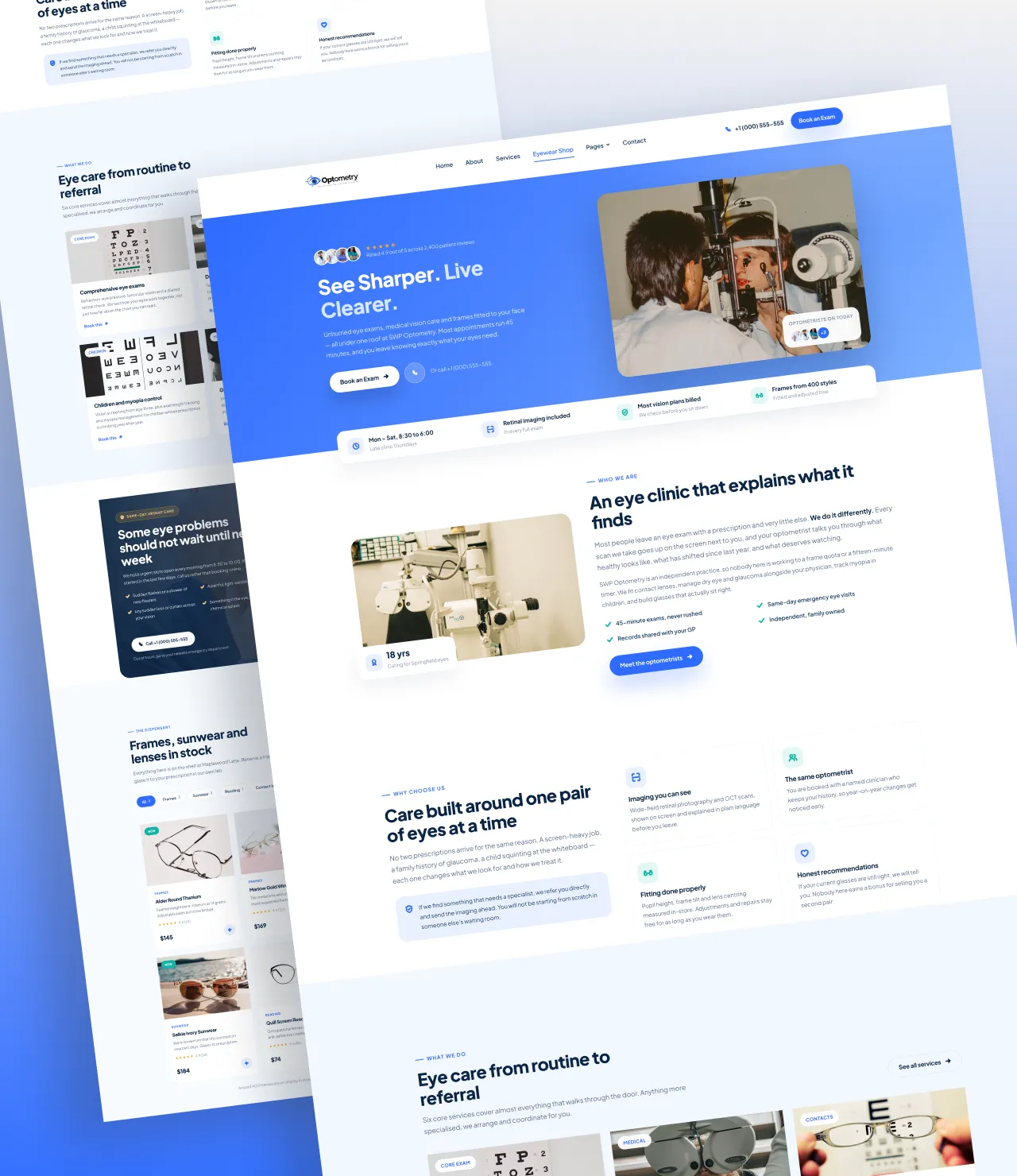
Most eye care websites do one job badly: they describe a practice instead of filling its diary. SWP Optometry Pro is an Optometry WordPress Theme built the other way round – every screen, from the hero to the footer, is arranged to move a visitor toward one of two actions: book an eye exam, or buy a pair of frames.
It is a complete eye clinic WordPress theme and online eyewear store in a single package. Install it, run the one-click demo importer, replace the placeholder text, and an optometry practice website that would normally take a developer three weeks is live the same afternoon.
Why this Optometry WordPress Theme is designed around the patient journey
Patients researching an optometrist website want four things quickly: what you treat, who will treat them, what it costs, and how soon they can be seen. This optical store WordPress theme puts all four above the scroll line.
The homepage opens with a hero, a five-star patient rating strip and a quick-facts bar – opening hours, imaging included, insurance billing and frame range – followed by twelve reorderable sections:
- About the practice with a floating experience badge and tick-list
- Why choose us feature cards for your clinical differentiators
- Services driven by a Services custom post type
- Urgent eye care band for same-day red-eye and floaters appointments
- Eyewear shop – a live WooCommerce product grid with category filters
- Our optometrists team grid with bios and social links
- Patient testimonials carousel with autoplay, arrows and dots
- Exam pricing with a vision insurance and payment panel
- FAQ accordion plus a “what to bring to your appointment” checklist
- Vision journal blog grid
- Book an exam – a Contact Form 7 appointment form beside your clinic details, parking and access notes, and a Google Map
Every section can be dragged into a new order, switched off, or given completely different content on each page. The About section on your homepage and the About section on your About page are separate settings, so you never have to compromise one to fix the other.
A built-in eyewear shop, not a bolted-on one
Frames, sunwear, readers, contact lenses and solutions all sell through WooCommerce, and every WooCommerce page is styled to match: shop, product category archives, single product, cart, checkout, order received and my account. Product cards carry a category label, star rating, sale badge and a one-tap AJAX add-to-cart button, and the header bag pill updates without a page reload.
Product pages include a reassurance list under the add-to-cart button – glazing in your own lab, free adjustments, delivery and returns – because an optical purchase needs answering before it converts. The thank-you page closes with a branded “what happens next” panel so patients know when to collect.
Online appointment booking that reception can actually use
Appointment booking runs on Contact Form 7, so there is no proprietary form builder to learn and no add-on to renew. The demo importer creates three ready forms: an appointment request on the homepage and contact page, a per-service booking form on every single service page, and a short offer form inside the pop-up. Each service can override the form from its own edit screen.
A scroll pop-up that converts without annoying
The promotional pop-up fires at 50% scroll depth by default – late enough that a visitor has read something, early enough that they are still reading. Switch it to a timed or exit-intent trigger, choose how often it may reappear (per session, daily, once ever), pick which pages it runs on, and set the image, headline, copy, button and form. Every setting lives in the Customizer.
SEO and accessibility built in
The FAQ section outputs FAQPage structured data, so your answers can appear as rich results in Google. Headings follow a clean hierarchy, images carry editable alt text, the colour palette is contrast-tested, focus states are visible throughout, and the whole responsive design reflows cleanly from a 1380px desktop grid down to a 375px phone with a sticky call-and-book bar.
Total control without touching code
You should never need a developer to restyle an Optometry WordPress Theme. The Customizer gives you a seventeen-colour palette, seven typography choices, content width, corner style, per-page banner images, header and footer content, clinic contact details, opening hours, social links, shop layout and additional CSS. Change the brand colour once and the hero gradient, buttons, icons, links and badges all follow.
Who this Optometry WordPress Theme is for
Choose it for an independent optometrist website, a multi-doctor vision clinic, an ophthalmology practice, a hospital eye department, an optician’s shop, a contact lens specialist, a paediatric myopia clinic, or an online eyewear store that also books exams.
SWP Optometry Pro is the Optometry WordPress Theme for practices that want their website to fill the diary, not just describe the building.
What you get
14 templates, ready to edit
All of them install with the demo content, and all of them are patterns rather than locked layouts.
Home
Our Studio
Services
Service detail
Shop Page
Product Details Page
Gallery
Journal
Single Post Page
Contact
FAQ
404 Error
Cart
Checkout
Compatibility
The technical details
| Current version | 1.0 |
|---|---|
| Last updated | Aug 24, 2026 |
| WordPress | 6.2.2 + |
| PHP | 7.4+ |
| Theme type | WordPress Customizer |
| Works with | Kirki, Rank Math, Yoast, WPML, Polylang, Contact Form 7, Light Speed Cache |
| Browsers | Chrome, Safari, Firefox, Edge - current and previous versions. |
| Languages | POT file included, RTL stylesheets, translation ready. |
| Download size | 3 MB |
| Licence | GPL v2 or later |
Changelog
Recent updates
Every fix and addition since release, free for anyone who owns it.
Aug 24, 2026
1.0
Initial Release
New Product Release
Reviews
What buyers say about Optometry WordPress Theme
No reviews yet — be the first to say how it went.
Only customers who have bought this product can review it.
Before you buy
Questions about Optometry WordPress Theme
Does this Optometry WordPress Theme work with WooCommerce?
Yes. WooCommerce support is built in, not bolted on. The shop, product category archives, single product, cart, checkout, order received and my-account pages are all styled to match the rest of the theme, and the demo importer creates eight sample products across frames, sunwear, reading glasses and contact lenses.
Do I need to know code to set it up?
No. Install the theme, run the one-click demo importer, then edit everything from the WordPress Customizer - over 500 settings covering colours, typography, layout width, every section's content, the header, the footer and the pop-up. There is an Additional CSS box if you ever want it, but nothing requires it.
How do patients book an appointment?
Through Contact Form 7, which the setup wizard installs for you. The importer creates three ready-made forms: an appointment request for the homepage and contact page, a booking form on every single service page, and a short offer form inside the pop-up. Any service can use its own form instead.
Can I reorder or hide the homepage sections?
Yes. All twelve sections are drag-to-reorder in the Customizer, and each has its own show/hide switch. Better still, each page keeps its own copy of a section's content - so the About block on your homepage and the one on your About page can say completely different things.
Is SWP Optometry Pro good for SEO?
It is built to give an SEO plugin a clean foundation. Headings follow a proper hierarchy, the FAQ section outputs `FAQPage` structured data for rich results, images take editable alt text, and the markup is lightweight and semantic. Pair it with Yoast or Rank Math for meta titles, descriptions and sitemaps.
Can I use it for an ophthalmology or eye hospital site instead?
Yes. Nothing in the theme is optometry-specific beyond the demo wording. It suits ophthalmology practices, hospital eye departments, LASIK and refractive surgery clinics, opticians, contact lens specialists and eyewear boutiques equally well - rename the Services entries and rewrite the copy.
Does it support translation and RTL languages?
Yes. Every string is wrapped for translation and the theme ships a text domain, so it works with WPML, Polylang, TranslatePress and Loco Translate. Right-to-left layouts are supported.
Can I change the colours to match my practice branding?
Yes. Seventeen colour swatches drive every CSS variable in the theme. Change the brand colour once and the hero gradient, buttons, icons, links, badges and focus states all follow automatically. There are also seven font choices, plus a system font stack option that removes the Google Fonts request entirely.
Will the demo importer overwrite my existing content?
No. It matches pages, services, posts and products by slug and images by an attachment key, so it is safe to re-run - it repairs rather than duplicates. On a fresh site it does set a static front page, trash WordPress's "Hello world!" starter post, and switch the WooCommerce Cart and Checkout pages to the classic shortcodes so the theme can style them. All of that is reversible and documented in the theme's readme.
You might also consider
Related products

Still deciding
Click through the demo first
The preview is the complete theme, on the same content the importer installs.
support@scintillawpthemes.com