

A hiring manager opens your portfolio link between two meetings. They give it maybe a minute. In that minute, they want to know three things: what kind of problems you solve, how you think, and whether you can explain your decisions. Pretty screens alone don’t answer any of those.
That is why choosing from the many WordPress themes for UX portfolio sites is harder than it looks. A theme built for photographers shows big images and little else. A UX portfolio needs room for words: the problem, the research, the trade-offs, the result. It also has to be easy to use, because a clumsy portfolio quietly argues against your own skills.
This guide covers 15 themes, free and premium. Each one gets an honest look at who it suits and where it falls short. We build and sell WordPress themes at ScintillaWPThemes, so four of the picks are ours. They are clearly marked, and we tell you where they are not the right fit. The other picks come from the official WordPress.org theme directory and ThemeForest, checked in October 2026.
You will also find a short guide to structuring a case study page, tips for showing work you signed an NDA for, and the mistakes we see most often when designers build their own portfolio.
Table of Contents
Quick Picks
Short on time? Start here.
- Best free theme for a first UX portfolio: Freelancer Design Portfolio (ours) or Twenty Twenty-Five, both block themes you edit without a page builder.
- Best for long, written case studies: Copywriter Portfolio WordPress Theme (ours), built around reading, not scanning.
- Best for freelance UX designers who sell services: Freelancer WordPress Theme (ours), with About, Services and single case study pages already designed.
- Best one-page CV site: RyanCV on ThemeForest.
- Best for a design studio with many projects: Kalium on ThemeForest.
What a UX Portfolio Theme Actually Needs
A UX portfolio is a reading experience first and a gallery second. Before you look at any demo, check it against these five needs.
Room for case studies, not just thumbnails. A case study is a long page that walks through one project: the problem, your role, the research, the design decisions and the outcome. Your theme needs a single project template (one page per project) that handles long text, images and captions without looking cramped. A grid of pretty tiles that opens a lightbox is not enough.
Typography that is easy to read. Reviewers will read a long case study if the page is comfortable. Look for a readable body font size, a sensible line length and clear heading levels. If the demo’s body text looks tiny or light grey, reading your work will feel like effort.
Fast and calm on a phone. Many reviewers open portfolio links on their phones. Heavy sliders, autoplay video and page-load animations get in the way. Open every demo on your own phone before deciding.
A clear path to contact you. Every page should make it obvious how to reach you or download your CV. Burying the contact link is a small UX failure that people notice.
Pages you can edit yourself. You will update this site every time you finish a project. Choose an editing style you are comfortable with. A block theme is edited in the WordPress block editor (Full Site Editing). A Customizer theme is set up from Appearance → Customize. A page builder theme depends on a plugin like Elementor or WPBakery all three work. Switching later is the painful part, so pick once.
One more thing that is specific to UX work: NDA projects. Much product work can’t be shown in public. WordPress lets you set any page to password-protected so that you can share a private case study link with a recruiter. Any theme on this list supports it, because it is a core WordPress feature. One caution: the password hides the page, not the image files on it. Anyone with a direct image link can still open the file, so blur or redraw anything truly confidential.
Best Free WordPress Themes for UX Portfolio Sites
Every free theme below is listed in the official WordPress.org directory, so it has passed the directory’s code review and updates from your dashboard. Free themes are a good way to launch, publish two or three case studies and start applying. Support comes from the WordPress.org forums, not a ticket desk.
1. Freelancer Design Portfolio
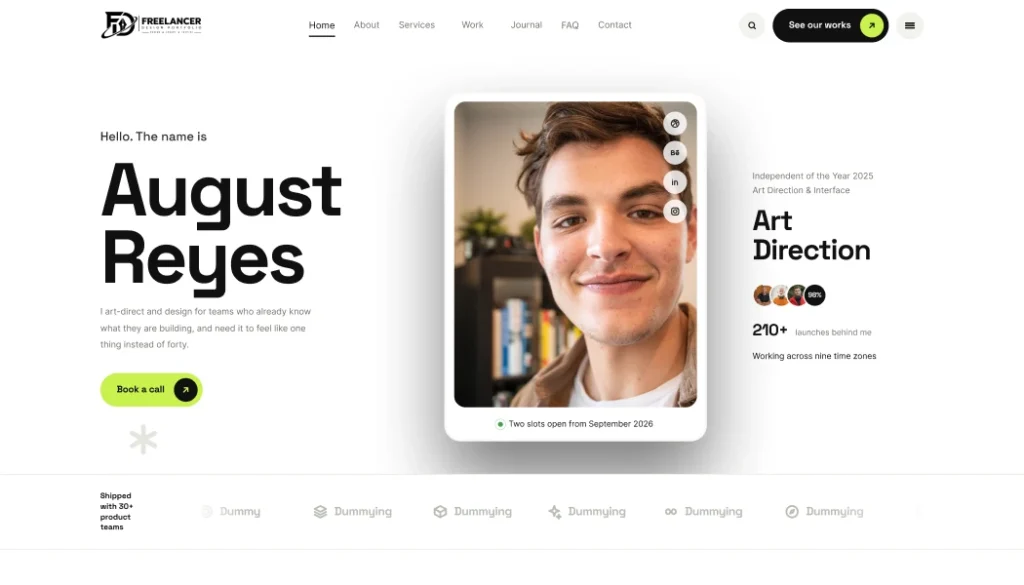
Image: homepage hero of the demo.
Freelancer Design Portfolio is our free block theme, and we kept it small on purpose. It ships four sections: a hero with your name, discipline and availability status, an About section, a project grid, and a Contact section with room for your form plugin. Everything is edited as native blocks, so there is no page builder to learn and nothing to lock your content in.
For a UX designer, that small scope is useful. A reviewer learns who you are and sees your projects in a few seconds. The trade-off is honest: there is no dedicated case study template. You write each case study as a normal page or post, which works fine with blocks but takes a little setup.
It works with Rank Math, Yoast, WPML, Polylang and Contact Form 7; needs WordPress 6.0 or higher and PHP 7.4 or higher; and was last updated on October 19, 2026.
Best for: A first UX portfolio on zero budget.
Price: Free · Live demo · Theme details · Download from WordPress.org
2. Twenty Twenty-Five
Image: Twenty Twenty-Five portfolio pattern.
Twenty Twenty-Five is the default theme made by the WordPress team, with more than 1 million active installs. It is a block theme with many patterns (ready-made block layouts) and several style variations. It carries the directory’s “Accessibility ready” tag, which matters when your portfolio is meant to show you care about users.
It was not built only for portfolios, and that is its strength for UX work. You get clean typography and calm layouts that suit long, text-heavy case studies, and you control the structure of every page. That restraint helps a UX portfolio, because the work stays in front.
The downside is that you start closer to a blank page. You will spend a few hours building your homepage and project template from patterns. If you enjoy that kind of system work, it will feel natural.
Best for: Designers who want a clean, accessible base and full control. Price: Free
3. Portfolio WP
Image: Portfolio WP case study pattern.
Portfolio WP is a block theme made for designers and other creatives. The detail that makes it relevant here: its description says it includes patterns for case studies, as well as galleries and other layouts. That gives you a head start on the one-page type most portfolio themes ignore.
You edit everything in the Site Editor, so changing fonts, colours and spacing does not need code. It also offers style variations if you want a quick change of look. The directory lists 500+ active installs and version 1.2.7, last updated on February 4, 2026.
Before you commit, open the preview and look at the case study patterns closely. Check that they fit how you tell a story: problem, process, result. Also note the update date. Eight months without an update is not a problem in itself for a block theme, but keep an eye on it.
Best for: Designers who want case study patterns out of the box. Price: Free
4. Web Designer Portfolio
Image: Web Designer Portfolio hero.
Web Designer Portfolio by Ovation Themes names UI/UX designer sites directly in its description. It offers a portfolio grid, a hero section, hover effects and several style variations, and it can connect to a Portfolio Gallery plugin for interactive project galleries.
The theme leans visual, with smooth animations and parallax scrolling (background images that move at a different speed from the page). That can look good, but use it with care. Motion that slows reading or makes some people feel unwell works against the message of a UX portfolio. Keep animation light and test on a slow phone connection.
It is a commercial theme in the directory’s terms, which means the free version is complete but the author also sells a paid upgrade. The user base is small, at a few hundred active installs.
Best for: UI-focused designers whose work is very visual. Price: Free, with a paid upgrade available
5. FSE Portfolio
Image: FSE Portfolio homepage.
FSE Portfolio by Themes Cart is a full site editing theme (another name for a block theme) aimed at designers, developers and freelancers. It ships seven style variations, project highlight sections and banners you can edit in the block editor.
It was updated on July 14, 2026, so it is actively maintained, and the directory lists 300+ active installs. Like the other block themes here, it keeps your content in standard blocks. That makes it easier to switch themes later without rebuilding every page.
For UX use, its project highlight sections work well on the homepage. You will still want to plan a separate page for each case study rather than showing everything in one long scroll. The theme description also mentions built-in shortcodes; avoid relying on those for your main content, because shortcodes can stop working if you change themes.
Best for: Freelancers who want a quick, colourful block theme start. Price: Free, with a paid upgrade available
6. SKT UI UX
Image: SKT UI UX homepage.
SKT UI UX is named after the field, but read the description closely. It is a design agency-style template built for the Elementor page builder, covering web, product, app and graphic design studios, with freelancers as a secondary audience.
That makes it a reasonable pick if you are a small UX studio or plan to become one, and you already know Elementor. Its flat, minimal design and simple navigation fit the field. It works with WooCommerce, Contact Form 7 and SEO plugins.
There are two things to weigh. First, it depends on Elementor, so your layouts live in that plugin. Second, the directory lists 100+ active installs and a last update on March 4, 2026, so the community around it is small. If you are a solo job seeker, a block theme above will probably be simpler to maintain.
Best for: Small UX studios already using Elementor. Price: Free, with a paid upgrade available
7. Neve
Image: Neve starter site.
Neve by Themeisle is a lightweight, general-purpose theme with 200,000+ active installs. It works with the block editor and with page builders such as Elementor, and it lists portfolios among its intended uses.
Neve is the safe middle ground. It is not a portfolio theme, but it is widely used and well maintained, so you are unlikely to be stuck with an abandoned theme. Its starter sites help if you don’t want to design from scratch. Because it adds little on top of WordPress itself, the look of your case studies depends mostly on how you build them.
Choose Neve if you want flexibility to grow the site later, for example by adding a blog, a services page or a small shop, without changing themes. The paid version adds more layout options, but you don’t need it for a portfolio.
Best for: Designers who want a dependable, flexible base. Price: Free, with a paid Pro version
Best Premium WordPress Themes for UX Portfolio Sites
Premium themes earn their price when they save you hours of layout work or give you page types the free themes don’t have. Our three themes come first and are marked. The ThemeForest picks follow, with prices and sales figures as listed on ThemeForest’s portfolio category on October 20, 2026. A ThemeForest regular license covers one end product and includes 6 months of author support.
8. Freelancer WordPress Theme
Image: Freelancer theme case study page.
The Freelancer WordPress Theme is the premium version of our free theme above, and the difference is scope. The free theme is a strong homepage. This is a full site. It ships with 11 templates, including About, Services, Service detail, Our work, a Portfolio single page for each case study, a Journal and an FAQ.
That matters for freelance UX designers. Clients want to know what you offer and how you work, not only what you made. A Services page and an FAQ answer those questions before the first call. The theme is set up in the native WordPress Customizer with live preview, with no page builder involved. The demo uses black, white and lime, but colours and fonts are fully editable.
It is deliberately narrow. If you need a full shop, a membership area or many authors, it is the wrong theme. Requirements are WordPress 6.2.2+ and PHP 7.4+, and it works with Rank Math, Yoast, WPML, Polylang and Contact Form 7.
Best for: Freelance UX designers who sell services. Price: $33 one-time (regular $49), one site, 1 year of updates and email support · Live demo · Theme details
9. Copywriter Portfolio WordPress Theme
Image: Copywriter theme journal layout.
We built Copywriter Portfolio for people whose product is language, and the product page names UX writers and technical writers among its audiences. If you are a content designer or UX writer, your case studies are mostly words: voice guidelines, before-and-after microcopy, research notes. This theme is set up for reading, with Bodoni Moda headings, a Jost body font and a warm paper palette.
Its most useful feature is a page-by-page section builder. It ships 14 modular sections, such as Working Method, Milestones and FAQ, across six page templates. Each page keeps its own copy of every section and its own order, so your About page and homepage can say different things. You set it all up in the Customizer through the Kirki framework, and the setup wizard installs Kirki and Contact Form 7 for you.
It also includes a Service post type, so each service gets its own page. If your work is mainly visual screens, Freelancer above is the better fit.
Best for: UX writers and content designers. Price: $33 one-time (regular $49) · Live demo · Theme details
10. Actor Portfolio WordPress Theme
Image: Actor Portfolio showreel section.
To be upfront: we designed Actor Portfolio for actors and performers, not UX designers. We include it for one specific case. If your best work is motion design, interaction prototypes or video walkthroughs, its structure transfers well.
The showreel section takes a YouTube, Vimeo or MP4 link and plays it in a pop-up. The video only loads when someone presses play, so a video-heavy homepage does not slow down. A tabbed credits section can be renamed, so tabs like Film and Theatre could become Mobile, Web and Design Systems. The theme uses no jQuery, no icon font and no slider library, and below-the-fold images are lazy-loaded.
It is lighter on long written case studies than Freelancer or Copywriter. Treat it as a strong visual front page, and link out to longer write-ups on inner pages.
Best for: Interaction and motion designers who lead with video. Price: $33 one-time (regular $49) · Live demo · Theme details
If you’ll build more than two sites, for example, your own portfolio plus client sites, the WordPress Theme Bundle covers 15 live sites for $89, one-time. Staging and local copies don’t count toward the 15.
11. Kalium
Image: Kalium portfolio single item layout.
Kalium by Laborator is one of the best-selling creative themes on ThemeForest, with 47,337 sales and a 4.94 rating from about 2,400 reviews. It was updated on October 8, 2026.
For UX work, the key feature is choice in project pages. It offers seven portfolio single-item types, including side layouts, columned layouts with a checklist, zig-zag and full screen. A side layout with text beside images works well for case studies. The author also states that Kalium follows WCAG 2.0 at AA level (a widely used accessibility standard).
Be aware of how it is built. The demo sites are made with WPBakery Page Builder, and the author notes that Elementor can’t be used to edit existing demo content. It is also a large multipurpose theme with many bundled plugins. That is more than a solo job seeker needs, but it suits a studio with many projects.
Best for: UX studios and senior designers with a deep body of work. Price: $99
12. Ohio
Image: Ohio creative portfolio demo.
Ohio by colabrio is built for Elementor and WooCommerce. It has 22.4K sales and appears in ThemeForest’s weekly bestsellers for portfolio themes.
Ohio suits designers who are comfortable in Elementor and want a polished, editorial look without designing every page from scratch. The WooCommerce support is a real plus if you plan to sell something next to your portfolio, such as a UI kit, a Figma template or a short course.
The question to ask before buying is whether you need that range. A large theme gives you many layouts, but it also means more settings to manage and more to keep updated. Open the demo on your phone and check one long project page with plenty of text. If it reads comfortably, Ohio is a solid choice. If the text feels squeezed between visual effects, look at a simpler theme.
Best for: Elementor users who may sell digital products. Price: $69
13. RyanCV
Image: RyanCV vCard layout.
RyanCV by bslthemes is a personal portfolio and resume theme with 5,276 sales and a 4.98 rating from 212 reviews. It was updated on September 22, 2026. It is compatible with Elementor and ships with Advanced Custom Fields Pro bundled, which powers its theme options.
The layout puts your profile, CV and portfolio in a compact, card-style site, often called a vCard theme. For a UX job search, this is efficient. A recruiter sees your experience, skills and selected work without clicking through many pages.
The limit is depth. A vCard layout is great for a summary and weaker for long case studies. A good pattern is to keep two or three short project cards on the main view, then link each one to a full case study page or a password-protected page for NDA work.
Best for: Job seekers who want a sharp one-person CV site. Price: $39
14. Leven
Image: Leven resume theme homepage.
Leven by LMPixels is a personal website and resume theme with 2.1K sales, and it sits in ThemeForest’s top-rated list for the portfolio category.
It is a good alternative to RyanCV if you prefer its visual style. The decision between the two is mostly about taste, so open both demos side by side. Compare how each shows a timeline of experience, because for UX researchers and senior designers, the career story matters as much as the projects.
Like other resume themes, Leven is built around a profile, not around long case studies. Plan where your detailed write-ups will live before you buy. If you expect to publish more than four or five in-depth case studies, a theme with a proper project template, such as Freelancer or Kalium, may serve you better over time.
Best for: UX researchers and designers who lead with experience. Price: $49
15. Uifolio
Image: Uifolio homepage.
Uifolio by ThemesCamp is an Elementor creative portfolio and digital agency theme. The name says who it is aimed at, and it covers both a personal portfolio and a small agency site.
It is much newer and smaller than the other ThemeForest picks, with 85 sales at the time of writing. A smaller sales count doesn’t mean lower quality, but it does mean fewer reviews to learn from. Read the comments tab on ThemeForest to see how quickly the author answers questions, and check the changelog for recent updates.
It suits a UI/UX designer who is growing from solo freelancing into a small team and wants one theme that covers both. As with any Elementor theme, keep your case study text in standard text widgets rather than heavy effects, so it stays readable and easy to move later.
Best for: Freelancers growing into a small UX agency. Price: $39
All 15 Themes Compared
Prices and figures as listed on WordPress.org, ThemeForest and our product pages on October 20, 2026.
| Freelancer Design Portfolio (ours) | WordPress.org | Free | Block editor | First UX portfolio |
| Twenty Twenty-Five | WordPress.org | Free | Block editor | Accessible, clean base |
| Portfolio WP | WordPress.org | Free | Block editor | Case study patterns |
| Web Designer Portfolio | WordPress.org | Free | Block editor | Visual UI work |
| FSE Portfolio | WordPress.org | Free | Block editor | Quick freelancer start |
| SKT UI UX | WordPress.org | Free | Elementor | Small UX studios |
| Neve | WordPress.org | Free | Block editor or page builder | Flexible base |
| Freelancer WordPress Theme (ours) | ScintillaWPThemes | $33 | Customizer | Freelancers selling services |
| Copywriter Portfolio (ours) | ScintillaWPThemes | $33 | Customizer (Kirki) | UX writers, content designers |
| Actor Portfolio (ours) | ScintillaWPThemes | $33 | Customizer (Kirki) | Motion and prototype videos |
| Kalium | ThemeForest | $99 | WPBakery | Studios with many projects |
| Ohio | ThemeForest | $69 | Elementor | Portfolio plus digital products |
| RyanCV | ThemeForest | $39 | Theme options (ACF Pro), Elementor | One-page CV site |
| Leven | ThemeForest | $49 | See item page | Experience-led resume |
| Uifolio | ThemeForest | $39 | Elementor | Solo to small agency |
Want to see more designer-friendly options? Browse our full Portfolio theme category or the free WordPress themes we publish on WordPress.org.
How to Structure a UX Case Study Page
Whichever theme you pick, the case study page does most of the work. This is a structure that reads well in any of the themes above. Build it once, then copy it for every project.
- Title and one-line summary. Name the product and state the outcome in plain words, for example, “Redesigning checkout for a grocery app.”
- Your role, team and timeline. Three short lines. Reviewers want to know what you did, not what the team did.
- The problem. What was broken, for whom, and how you knew. Keep it to a short paragraph.
- Process highlights. Pick the two or three moments that changed the design: a research finding, a test that failed, a trade-off you argued for. Skip the full textbook process.
- Key screens with captions. Every image gets a caption that explains the decision, not just what the screen is.
- Outcome. Real results if you have them. If you don’t have numbers, say what you learned and what you would do next.
- Next step for the reader—a link to the next case study and a clear way to contact you.
In a block theme, save this layout as an unsynced pattern (a saved group of blocks that you can insert and then edit freely each time). Every case study then starts from the same skeleton. In a Customizer or page builder theme, duplicate your first finished case study page and replace the content.
How to Choose the Right Theme
Answer these four questions in order, and most of the list rules itself out.
1. Are you job hunting or selling services? Job seekers need a fast route to a CV and two or three deep case studies, which points to RyanCV, Leven, Twenty Twenty-Five or Freelancer Design Portfolio. Freelancers need a Services page and an FAQ as well, which points to the Freelancer WordPress Theme or Kalium.
2. Is your work mostly screens, words or motion? Screens suit most themes here. Words suit Copywriter Portfolio or Twenty Twenty-Five. Motion and video suit Actor Portfolio.
3. How do you want to edit? If you already know Elementor, Ohio, Uifolio and SKT UI UX will feel familiar. If you would rather avoid page builder plugins, choose a block theme or a Customizer theme.
4. Does the demo pass your own usability test? Open the demo on your phone. Find a project page, read a paragraph, then try to reach the contact page. Count the taps. If you get lost or annoyed, so will a recruiter.
Every ScintillaWPThemes theme has a free live demo you can click through before you buy, which you can find on each theme’s page in our premium themes catalogue. That matters because all our sales are final. The files are delivered instantly, so we can’t offer refunds, and the demo is your chance to be sure first. If you are unsure whether a theme fits, ask us before you buy.
Common Mistakes to Avoid
Too many projects, too little story. Ten thumbnails with no context say less than three full case studies. Curate hard and go deep.
Heavy motion on every page. Scroll animations and page transitions feel impressive for a moment and slow everyone down after that. Most themes let you turn effects off. Do it on reading pages.
Low-contrast text. Light grey text on white looks elegant in a mockup and fails real readers. Check your colours against the WCAG contrast guidance. A UX portfolio that fails basic accessibility undercuts your own message.
Uploading full-size screenshots. Export images at the size they display and use a modern format like WebP. Oversized images are a common reason portfolio pages feel slow.
Forgetting the about page. Clients and hiring managers hire people. A short bio with a photo, how you work and what you are looking for builds trust quickly.
Using a single-site licence on several sites. A single ScintillaWPThemes licence covers one live site. If you are building your own portfolio and client sites, the bundle is the right licence.
FAQs
Is WordPress a good choice for a UX portfolio?
Yes, especially if you want to own your site and write long case studies. You control hosting, design and content, and you can add a blog later. Tools like Webflow or Framer give more visual control out of the box but tie you to their platform. WordPress takes a little more setup and gives you more freedom in return.
Can I show NDA work on my portfolio?
You can share it privately. Set the case study page to Password Protected in the page settings and send the password only to recruiters. Remember that images on a protected page can still be opened by anyone who has their direct link, so blur or redraw anything confidential.
Do I need a page builder like Elementor?
No. Block themes such as Twenty Twenty-Five and Freelancer Design Portfolio use the built-in WordPress editor. Customizer themes such as our Freelancer theme don’t need a builder either. Choose Elementor-based themes only if you already like working in Elementor.
Should I start with a free or premium theme?
Start free if you have fewer than three case studies ready. Move to premium when you need page types the free theme lacks, such as a Services page, an FAQ or several case study layouts. Your posts and pages stay in WordPress when you switch themes. Layouts built with a theme-specific tool or page builder may need rebuilding.
Can I use one ScintillaWPThemes license for my portfolio and a client site?
No. A single-theme license covers one live site. The bundle covers 15 live sites, and staging or local copies don’t count toward that number.
What happens after the first year of a premium theme?
Your site keeps working exactly as it is. Updates and email support pause after 12 months, and you can renew to bring them back.
Final Thoughts
The best WordPress themes for UX portfolio sites have one thing in common: they let your thinking come through. Pick the theme that fits how you work. Choose a block theme if you want a light, accessible base. Choose a full-site theme like Freelancer if you sell services. Choose a resume theme like RyanCV if you are job hunting and want a fast summary.
Then spend most of your time on the case studies themselves. Three clear, well-captioned projects will open more doors than a perfect theme with thin content.
If you want to try before you commit, download Freelancer Design Portfolio for free, or click through the Freelancer WordPress Theme demo. And if you build sites for others too, the WordPress Theme Bundle gives you our whole catalogue for 15 live sites at $89, one-time.
Related reading: Best WordPress Themes for Portfolio · WordPress Themes for Artists · WordPress Themes for Photography · WordPress Themes for Digital Products
3 comments
Comments are closed.
[…] 10 Best WordPress Themes for UX Portfolio (Free & Premium) […]
[…] 10 Best WordPress Themes for UX Portfolio (Free & Premium) […]
[…] 10 Best WordPress Themes for UX Portfolio (Free & Premium) […]