

A customer with a question either finds the answer on your site or opens a support ticket. The best wordpress themes for knowledge base sites are built to win that exact moment: instant live search, clean article categories, and calm reading layouts that get people to their answers fast.
We build and sell WordPress themes at ScintillaWP, and we verified every pick below on WordPress.org and ThemeForest in July 2026. All ten are knowledge base and documentation specific builds, not generic business templates with a search bar hastily added on top.
Key Takeaways
- Docy leads the maintained niche with docs, knowledge base, LMS, and forum in one package, updated 17 July 2026.
- Live search is the feature that pays. Every answer found in search is a support ticket that never gets opened.
- Prefer maintained themes always. Several famous knowledge base themes have quietly stopped updating.
What Makes a Good Knowledge Base WordPress Theme?
A good knowledge base theme includes instant live search with suggestions, article categories with clear icons, a table of contents on long articles, article feedback voting, breadcrumbs, and print-friendly layouts. Speed and readability matter most of all, because visitors arrive already frustrated and want an answer in seconds, not a beautiful animation.
Structure decides everything in this niche. A knowledge base lives or dies by how quickly a visitor moves from the homepage search box to the exact paragraph that solves their problem, so every pick below is judged on search quality, category clarity, and article readability before anything else.
Best Free WordPress Themes for Knowledge Base
Every option below comes from the official WordPress.org directory, so each one has passed security review and updates safely through your WordPress dashboard.
Free knowledge base themes are refreshingly honest about what they include: the correct structure, a working search, and clean reading pages. What they leave out is the automation layer, so expect to organise the categories, feedback, and analytics yourself or through plugins as the help centre steadily grows.
1. IKnowledgeBase
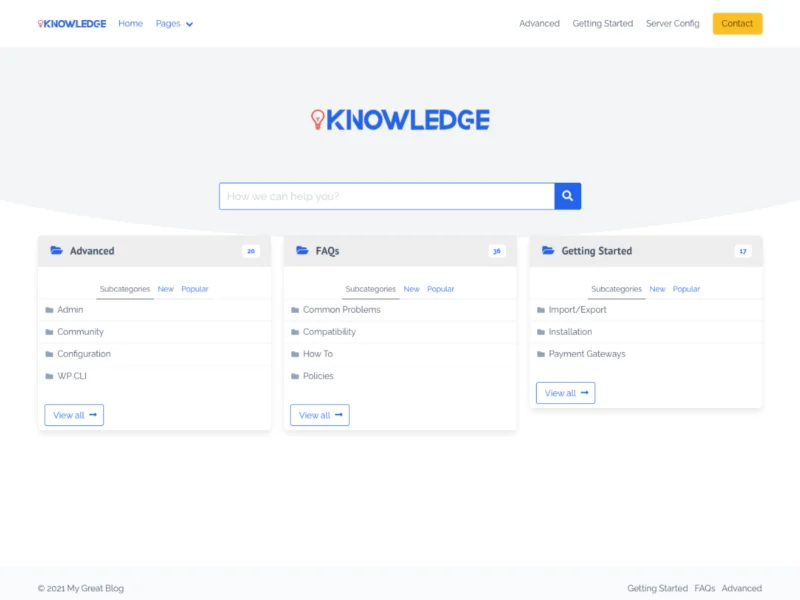
IKnowledgeBase (1,000+ active installs) is the most used free theme in this entire niche: a search-first homepage, clear article categories, and a clean two-column reading layout all ready out of the box.
A small product team gets a working self-service help centre without spending anything at all on the theme itself. USP: the most popular free knowledge base theme on WordPress.org. Price: Free.
2. MyWiki

MyWiki (900+ installs) recreates the classic wiki feel properly: minimal design, very fast loading, and an AJAX-powered live search that suggests matching articles as visitors type.
Teams that want a plain, distraction-free internal wiki get exactly that, with nothing extra to configure at all. USP: wiki-style simplicity with live AJAX search for free. Price: Free.
3. Iknow

Iknow (800+ installs) offers a genuinely modern take on the free knowledge base: category boxes with article counts, a prominent hero search, and FAQ support built in as standard.
A startup documenting its first product gets a contemporary look that never feels like a free theme. USP: modern category-box layout rare in free knowledge base themes. Price: Free.
4. MyKnowledgeBase

MyKnowledgeBase (500+ installs) keeps things deliberately light: a simple archive of articles, sidebar navigation, and typography carefully tuned for long technical reading.
Internal documentation and small product docs run comfortably on it without needing any page builder. USP: lightweight reading-first build for internal docs. Price: Free.
5. Knowledge Base Lite

Knowledge Base Lite (200+ installs) is the free version of a commercial knowledge base theme, so its structure closely mirrors paid builds: sections, articles, and search all styled cleanly.
It makes a sensible test run before committing to a premium licence later on. USP: commercial-grade structure in a free package. Price: Free.
Best Premium WordPress Themes for Knowledge Base
These five lead the knowledge base results on ThemeForest by total sales among niche-specific, actively maintained themes, with every figure verified in July 2026.
Worth knowing before the list: the three most famous names in this category did not make it. KnowHow last updated in September 2020, Manual in May 2024, and Flatbase in January 2023, so despite their impressive historic sales we recommend only the themes still shipping updates in the current WordPress cycle.
1. Docy

Docy by spider-themes ($89, 1,200+ sales, 50 ratings, updated 17 July 2026) bundles documentation, knowledge base, LMS, and a bbPress forum in one single theme, with full dark mode and the dedicated EazyDocs builder.
A software company gets its docs, help centre, courses, and community all on a single licence, and its latest update shipped this very week. USP: docs, knowledge base, LMS, and forum in one package. Price: $89.
2. Docly

Docly by CreativeGigs ($59, 1,200+ sales, 35 ratings, updated 29 January 2026) pairs online documentation with a bbPress helpdesk forum, wiki manuals, and complete support desk layouts.
Products whose users actively help each other get a community answer engine sitting right next to the official docs. USP: bbPress helpdesk forum integrated with documentation. Price: $59.
3. Lore

Lore by LSVRthemes ($59, 1,000+ sales, 34 ratings, updated 30 May 2026) is the reading-focused choice of this list: an elegant, distraction-free layout, full RTL support, and reliable long-term updates.
Tutorial libraries and long documentation that people actually sit down and read suit it perfectly. USP: the most elegant reading experience in the niche, with RTL. Price: $59.
4. Docfi

Docfi by RadiusTheme ($49, 311 sales, updated 15 July 2026) is the pure Elementor option: documentation and knowledge base layouts built entirely for drag-and-drop editing, with bbPress support included.
Teams already working in Elementor customise every single help page visually without ever touching code. USP: fully Elementor-based knowledge base building. Price: $49.
5. Tessera

Tessera by egemenerd ($59, 252 sales, updated 23 May 2026) is an all-in-one customer support centre: knowledge base, bbPress support forum, FAQ, and full Awesome Support helpdesk compatibility.
A business centralising every support channel onto one site gets the complete toolkit right here. USP: complete support centre with helpdesk plugin integration. Price: $59.
Free or Premium: Which Should You Choose?
Free themes like IKnowledgeBase and Iknow handle a small product or internal documentation perfectly well. The structure is correct, the search works, and the cost is zero, which matters when the knowledge base is a side project rather than the core business itself.
Premium earns its price the moment support volume becomes real. Docy and Tessera ship forums, feedback tools, and helpdesk integrations that deflect tickets every single day, and a knowledge base that removes even one future support hire pays for its theme thousands of times over.
One operating habit separates knowledge bases people trust from those they abandon: accuracy over volume. An article that describes an old interface wastes the visitor’s time twice over, once while reading it and once while discovering it is wrong. Keep a simple review date on each article, and update or remove anything that the product has clearly outgrown.
Free vs Premium: Quick Comparison
| Factor | Free Themes | Premium Themes |
|---|---|---|
| Cost | Free | $49 to $89 one time |
| Live search | Basic to good | Advanced with suggestions |
| Forum and helpdesk | Not included | bbPress and helpdesk ready |
| Article feedback | Rare | Voting and analytics |
| Support | Community forums | Six months from the author |
Want a professionally designed website without the premium theme price? Browse our premium WordPress themes built for speed, SEO, and easy customisation.
A quick note on data verification before the checklist. We checked every sales figure, rating count, and update date on ThemeForest and WordPress.org in July 2026, and the freshest updates in this list belong to Docy on 17 July and Docfi on 15 July. Update dates matter more in this niche than in most others, because knowledge bases lean heavily on search plugins, forums, and schema markup, and those integrations always break first whenever a theme falls behind WordPress core releases.
Budget beyond the theme itself as well. A serious knowledge base needs reliable hosting, a search enhancement plugin if traffic grows, and time set aside every month to update articles. The theme is the cheapest part of a help centre that genuinely deflects tickets, and skimping on the actual writing while spending on the design gets the priorities completely backwards.
Prepare your content before any demo import too. List the twenty questions your support team answers most often, group them into six to eight sensible categories, and write those exact articles first. A knowledge base with twenty excellent answers comfortably beats one with two hundred thin pages, both for your visitors and for the search engines.
How to Choose the Right Knowledge Base Theme
- Test the live search first. Type a partial word in the demo and see how fast suggestions appear.
- Check article readability. Long technical content needs a table of contents and calm typography.
- Decide if you need a forum. Docy and Docly include one; simpler picks do not.
- Match the builder to your team. Docfi suits Elementor users; Lore suits writers.
- Prefer maintained themes always. Docy and Docfi both shipped updates in mid July 2026.
Decide who the knowledge base serves before styling it. A developer-facing docs site leads with code blocks, versioning, and API references, which points to Docy or Docfi. A consumer help centre leads with plain language, screenshots, and friendly categories, which suits Lore or IKnowledgeBase. The very same product often needs both tones at once, and the picks above cover each one properly.
Common Mistakes to Avoid
Burying the search box. The search bar belongs in the hero section, large and obvious on every device. Visitors who cannot find the search leave and email support instead.
Giant uncategorised article lists. Group your articles into six to ten clear categories with icons. A flat wall of two hundred links helps absolutely nobody.
Writing for insiders. Customers search in their own words, never in your feature names. Title every article the way real users describe their problems.
Ignoring article feedback. A simple was-this-helpful vote shows you exactly which articles need rewriting before customers quietly give up on them.
Treat the knowledge base as living content, not a launch task. Review the search logs monthly to find questions with no matching article, update screenshots whenever the product interface changes, and retire any pages that now mislead. Teams that publish two new articles every month typically watch their ticket volume fall within a quarter, and the search engines reward that steady freshness too.
You can also browse the full Business & Corporate range, our free WordPress themes, or the complete theme bundle if you want every theme on one licence.
Related Reading
- 10 Best LMS WordPress Themes (Free & Premium)
- 10 Best WordPress Themes for Scientific Journal (Free & Premium)
- 11 Best WordPress Themes for Blogs (Free & Premium)
- 10 Best WordPress Themes for Software Company (Free & Premium)
FAQs on WordPress Themes for Knowledge Base
Which is the best WordPress theme for a knowledge base?
Docy leads the maintained niche themes with docs, knowledge base, LMS, and forum in one, updated on 17 July 2026.
Are there good free knowledge base themes?
Yes. IKnowledgeBase leads the free tier by installs, and Iknow offers the most modern free design.
How much does a knowledge base theme cost?
Free on WordPress.org, or $49 to $89 on ThemeForest with live search, forums, and feedback tools built in.
Do these themes include live search?
Yes. All the premium picks include instant search with suggestions, and MyWiki offers AJAX search for free.
Can I add a support forum to my knowledge base?
Yes. Docy, Docly, Docfi, and Tessera all support bbPress community forums directly.
What happened to KnowHow, Manual, and Flatbase?
They sold very well historically but have not updated recently, so we recommend the maintained alternatives above instead.
Do knowledge base themes work with Elementor?
Docfi is built entirely for Elementor, and Docy ships Elementor presets alongside its own EazyDocs builder.
Are these themes good for SEO?
Yes. All ten of them follow WordPress standards, work with Rank Math, and support FAQ and how-to schema.
Can one theme handle docs for several products?
Yes. Docy and Docly both organise multiple different products cleanly with fully separate documentation sections.
Do I need coding skills to set these up?
No. Every pick includes one-click demo import, and the premium options configure through visual settings panels.
Final Thoughts
The right wordpress themes for knowledge base projects turn your repeated support questions into articles that answer themselves around the clock. Start free with IKnowledgeBase to prove the writing habit first, then move up to Docy for the full docs suite, Docly for community answers, Lore for reading comfort, Docfi for Elementor, or Tessera for a complete support centre. Keep the search box huge, the categories few and clear, and the titles written in your customers’ own words, and the ticket queue keeps shrinking month after month.
Want help launching your knowledge base the right way from day one? Talk to our team, or read more practical guides on our WordPress blog.
1 comment
Comments are closed.


[…] 10 Best WordPress Themes for Knowledge Base (Free & Premium) […]