
Sometimes a website only needs one page. A freelancer, a local shop, an app launch, or an event does not need ten menu links. It needs one strong scroll from hello to contact. Picking the right one page theme for WordPress makes that scroll feel smooth and complete instead of cramped. The wrong pick makes a small site feel unfinished.
We build WordPress themes at ScintillaWP, and we checked live data from WordPress.org and ThemeForest in July 2026 for this list. Every theme here is built for one-page layouts specifically, with anchor menus, section builders, and smooth scrolling included. No generic multipurpose giants. Each entry gives you the USP, price, and best use case in one read.
Key Takeaways
- OnePress is the clear free winner with 60,000+ active installs, more than all other free one-page themes combined here.
- Premium one-page themes cost $39 to $89 and add parallax effects, section builders, and polished animations.
- One-page sites live or die on section order. Hero, services, proof, contact. The theme must make that flow easy to arrange.
What Makes a Good One Page WordPress Theme?
A good one page theme for WordPress offers stacked homepage sections you can reorder, an anchor menu that scrolls to each section, fast loading, and clean mobile behavior. Smooth scrolling and clear section breaks matter more here than on any multi-page site, because the whole story lives on one screen.
One-page sites suit freelancers, local businesses, product launches, events, and portfolios with a single clear goal. They are not the right tool for blogs, shops with many products, or content-heavy SEO plans, because Google can only rank one URL. Know that trade before you commit, and the format rewards you with focus and speed.
Best Free One Page WordPress Themes
All five come from the official WordPress.org directory. If you are hunting the best WordPress themes for one page website projects on a zero budget, start here.
1. OnePress
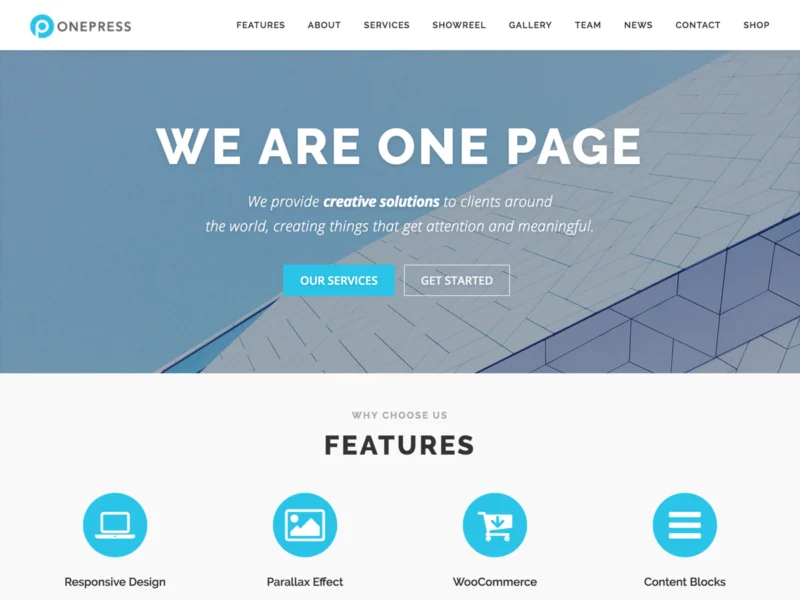
OnePress by FameThemes runs on more than 60,000 sites, making it the most trusted free one-page theme by a distance. The homepage stacks ready sections for hero, features, about, services, team, testimonials, and contact, all managed from the customizer with live preview.
Each section can be reordered or hidden, and the anchor menu updates to match. For a small business or freelancer, that means a finished one-page site in an afternoon without touching a page builder or a line of code.
USP: The most proven free one-page theme, complete section system on 60,000+ sites. Price: Free, Plus upgrade available.
2. One Page Express

One Page Express (10,000+ installs) is built around speed of creation. It ships with 30+ ready homepage sections and a drag-to-reorder interface, so you assemble the page like building blocks. Hero videos, sliders, and overlap sections are included free.
It suits people who want more visual variety than OnePress offers without paying for a premium theme. The trade-off is a slightly heavier page, so keep animations modest and images compressed.
USP: 30+ drag-and-drop sections, the fastest free way to compose a custom one-pager. Price: Free.
3. Shapely

Shapely by Colorlib (10,000+ installs) uses widgetized homepage sections: portfolio, testimonials, parallax banners, and call-to-action blocks that you fill through standard WordPress widgets. It looks more polished out of the box than most free themes.
Because sections are widgets, anyone who has used WordPress before already knows how to edit the site. It works well for small agencies and consultants who want a serious look without a learning curve.
USP: Widget-based sections that any WordPress user can edit on day one. Price: Free.
4. Illdy

Illdy (5,000+ installs) is a one-page business and landing theme with a bold hero, counters, projects, and testimonials arranged in a clean Bootstrap layout. Every section is managed from the customizer with live preview.
It fits startups and small firms that want a landing-page feel: one message, one button, proof below. The design has aged well because it stays simple, and simple keeps loading fast.
USP: Landing-page structure with counters and proof sections built in. Price: Free.
5. One Page Blocks

One Page Blocks is the modern-WordPress option in this list. It is a full site editing theme, so the entire one-pager is assembled from core block patterns inside the normal editor. No customizer settings, no widgets, no builder plugin.
The install count is small because block themes are still young, but the approach is where WordPress is heading. Pages stay extremely light, which suits the one-page format perfectly since the whole site is a single load.
USP: Pure block editing, the lightest and most future-proof way to build a one-pager. Price: Free.
Best Premium One Page Themes on ThemeForest
These five lead the one-page results on ThemeForest by sales, verified in July 2026. All are one-page-specific designs, not multipurpose themes with a one-page demo bolted on.
6. North ($59)

North by Veented is the best-selling dedicated one-page theme on ThemeForest with 5,800+ sales. It pairs parallax scrolling with a tailored drag-and-drop builder made for stacked sections, plus one-click demo sites to start from.
The design language is clean and agency-grade, and bundled premium plugins add real value. If you want the safest premium one-page pick with a decade of updates behind it, North is the benchmark.
USP: The best-selling one-page theme, with a builder made for section stacking.
7. Newave ($59)

Newave by ClaPat (5,400+ sales) is the design-first choice. Its parallax sections, full-width imagery, and typography give a one-pager the feel of a crafted brand site rather than a template.
Creative studios, photographers, and product brands get the most from it. Content needs are simple, so the visual layer carries the site, and Newave’s visual layer is among the strongest in the niche.
USP: The most refined parallax design in the one-page niche.
8. Skrollex ($41)

Skrollex (2,800+ sales) leans into motion: layered parallax, scroll-triggered animations, and creative section transitions that make scrolling itself part of the experience. Both one-page and multi-page layouts are included.
It suits creative freelancers and event pages where a memorable scroll beats a conservative layout. Use the effects with restraint and the site feels alive rather than noisy.
USP: Scroll animations that turn the page itself into the presentation.
9. One Page Pro ($89)

One Page Pro by GoodLayers (2,600+ sales) is the feature heavyweight. Its custom page builder was designed for one-page sites, with anchor handling, section backgrounds, and layout options that cover corporate, creative, and shop one-pagers.
The $89 price positions it for client work, where one license needs to handle many different one-page briefs. Agencies get a single reliable tool instead of a new theme per project.
USP: The most complete one-page toolkit for agencies handling varied client briefs.
10. Cardea ($39)

Cardea by CocoBasic (1,600+ sales, updated this month) is a one-page portfolio theme built on Elementor. The design is minimal and typography-led, letting portfolio work and personal branding take the front seat.
At $39 it is the value pick for freelancers and creatives. Elementor editing means every section is a visual drag-and-drop edit, and the unique layout does not look like every other one-pager online.
USP: A distinctive Elementor one-pager for creatives at the lowest price here.
Free or Premium: Which One-Pager Should You Pick?
Free covers more of this niche than most. A one-page site has no complex archives, no shop, and no layouts beyond the homepage, so OnePress or Shapely genuinely deliver the whole job for a freelancer or local business. Spend nothing until the format proves itself for you.
Premium earns its price when presentation is the product. Parallax depth, section transitions, and crafted typography in North or Newave make a brand feel bigger than it is. Agencies should also count time: One Page Pro’s builder pays for itself on the second client project. Either way, keep the section order honest: who you are, what you offer, why to trust you, how to contact you.
Free vs Premium: Quick Comparison
| Theme | Source | Price | USP |
|---|---|---|---|
| OnePress | WordPress.org | Free | 60K+ sites, complete section system |
| One Page Express | WordPress.org | Free | 30+ drag-and-drop sections |
| Shapely | WordPress.org | Free | Widget-based, zero learning curve |
| Illdy | WordPress.org | Free | Landing-page structure with proof |
| One Page Blocks | WordPress.org | Free | Full site editing, lightest build |
| North | ThemeForest | $59 | Best-selling one-page theme |
| Newave | ThemeForest | $59 | Most refined parallax design |
| Skrollex | ThemeForest | $41 | Scroll-triggered animations |
| One Page Pro | ThemeForest | $89 | Agency toolkit for client briefs |
| Cardea | ThemeForest | $39 | Elementor portfolio one-pager |
Planning a one-page website? Browse our premium WordPress themes, built light for fast single-page loads.
One practical note on data. Prices and install counts in this guide were verified on WordPress.org and ThemeForest in July 2026. Marketplaces discount often, so checkout prices can be lower than listed. Install counts move slowly, so treat them as a trust signal rather than a live number.
Also decide your builder preference before you buy. OnePress, Shapely, and Illdy edit through the customizer. One Page Blocks uses the core editor. Cardea needs Elementor, while North and One Page Pro ship their own builders. None is wrong, but mixing tools later costs rebuild time, so pick the editing style your team will actually enjoy using.
How to Choose a One Page Theme
- Count your sections first. List what the page must say, then confirm the theme has a matching section for each.
- Test the anchor menu on mobile. Tapping a menu item must scroll to the right spot on a phone, not past it.
- Check reorder freedom. You will change section order after launch. It should take seconds, not a developer.
- Watch the demo’s load speed. One-pagers stack everything on one URL, so a heavy demo means a heavy site.
- Confirm a blog fallback exists. If you might add content pages later, the theme should handle inner pages gracefully.
A one-pager also needs on-page SEO discipline. Give every section a descriptive heading, write one meta title and description around your main keyword, and add your city if you serve a local area. With a single URL, those few fields carry all the ranking weight, so fill them with care.
Common Mistakes to Avoid
Stuffing ten sections onto one page. A one-pager is an elevator pitch, not a brochure. Five to seven sections is the sweet spot.
Expecting multi-keyword SEO from one URL. One page ranks for one topic cluster. If you need to rank for many services, you need more pages.
Hiding the contact section at the very bottom without repeats. Add a contact button in the header and after the proof section too.
Full-size images in every section. Eight uncompressed banners on one URL will sink your load time. Use WebP under 100KB each.
Related ScintillaWP Themes
Most of our themes ship with a one-page demo rather than being one-page only. These are the ones that work best cut down to a single scroll.
- Freelancer WordPress Theme: A compact personal layout that works well as one page.
- Freelancer Design Portfolio: Free, and simple enough to run as a single scrolling page.
- Motivational Speaker WordPress Theme: A personal-brand layout that suits a one-page site.
You can also browse the full Portfolio range, our free WordPress themes, or the complete theme bundle if you want every theme on one licence.
Related Reading
- 11 Best WordPress Themes for Portfolio (Free & Premium)
- 10 Best WordPress Themes for Business (Free & Premium)
- 10 Best WordPress Themes for Company Websites (Free & Premium)
- 10 Best WordPress Themes for UX Portfolio (Free & Premium)
FAQs About One Page WordPress Themes
What is the best free one page theme for WordPress?
OnePress. With 60,000+ active installs and a full section system, it is the most proven free option.
Are one page websites good for SEO?
They rank well for one focused topic plus your brand name. For many keywords, multi-page sites win.
Which premium one page WordPress theme is best?
North, based on 5,800+ sales and a builder designed for section stacking. Newave wins on pure design.
How much does a one page WordPress theme cost?
Free on WordPress.org, or $39 to $89 one time on ThemeForest with six months of support.
Can a one page site have a blog?
Yes. All themes here support standard posts on separate URLs, so the blog lives beside the one-pager.
What sections should a one page website have?
Hero with one clear message, services or features, about, proof like testimonials, and contact. Five sections cover most goals.
Do these themes work with Elementor?
Cardea is Elementor based, and most free picks are compatible. OnePress and Shapely use the customizer instead.
Are one page themes fast?
They can be the fastest sites online because there is one URL to optimize. Compress images and skip heavy sliders.
Can I switch from a one page site to a full website later?
Yes. Add pages and menu links as you grow. Themes like North and One Page Pro include multi-page layouts already.
Who should use a one page WordPress theme?
Freelancers, local businesses, product launches, events, and portfolios with one clear action for visitors to take.
Final Thoughts
The right one page theme for WordPress turns a small website into a sharp pitch. Start with OnePress or Shapely free, and upgrade to North, Newave, or Cardea when design polish starts winning you work. Keep sections few, images light, and the contact button always within reach. A one-pager wins by saying less, better.
Want help building your one-page site? Talk to our team, or explore more guides on our WordPress blog.