

Business & Corporate
Sales: 10
sales
Coworking Space WordPress Theme
$33.00
$49.00
One-time · 1 site · 1 year of free updates & email support
Live preview
Buy now
- One-click Demo Import
- Child theme included
- Documentation
- 12 months of Email Support
About this theme
Inside Coworking Space WordPress Theme
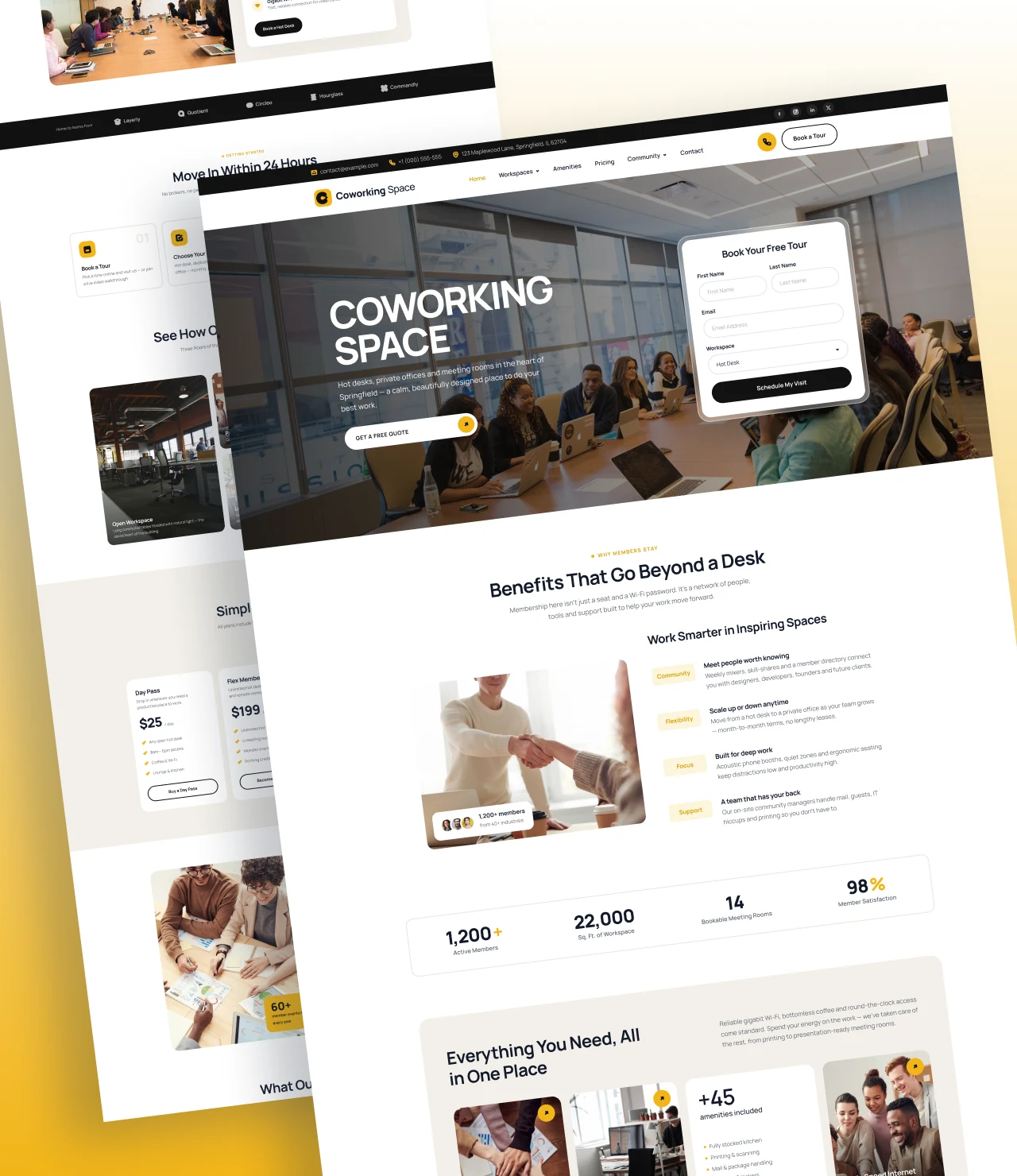
SWP Coworking Space Pro is a premium coworking space WordPress theme for shared offices, flexible workspaces, business centers, startup hubs, and hot desk providers. It turns a plain WordPress install into a polished, booking-ready website that shows off your space, explains your membership plans, and turns visitors into paying members. You can import the full demo in one click and edit every section from the WordPress Customizer, with no code.
Running a shared workspace is a hospitality business. Prospective members want to see the desks, check the amenities, compare prices, and book a tour in under a minute. This coworking WordPress theme is designed around that journey. Every section on the homepage answers one question a visitor has before they sign up.
A homepage that sells your workspace
The front page comes with thirteen ready-made sections. Each one can be switched on or off, reordered, and edited from the Customizer:
- Hero banner – a bold headline, short intro, two call-to-action buttons and a large workspace photo that sets the tone from the first second.
- About / Why members stay – tell your story with an image, a checklist of benefits, and a call to action.
- Stats counter – highlight members, desks, meeting rooms, and years in business.
- Amenities – icon cards for high-speed Wi-Fi, free coffee, 24/7 access, meeting rooms, printing, and parking.
- Workspaces – showcase hot desks, dedicated desks, private offices and meeting rooms with photos and short descriptions.
- Brands / Trusted by – a logo strip of companies that work from your space.
- How it works – a simple step-by-step guide from booking a tour to moving in.
- Gallery – a photo grid that lets visitors take a look inside before they visit.
- Pricing plans – clear membership tables with a highlighted “most popular” plan.
- Community – promote events, networking nights, and member perks.
- Testimonials carousel – a smooth, touch-friendly slider of member reviews with photos and ratings.
- FAQ – an accordion that answers common questions about contracts, access and guest passes.
- Contact – address, phone, email, opening hours and a Contact Form 7 enquiry form.
Full control from the WordPress Customizer
Every headline, paragraph, button, image, icon and colour is editable from Appearance → Customize. You can change the primary and accent colours, switch Google Fonts, upload separate header and footer logos, and edit the footer columns. Changes show in the live preview before you publish, so non-technical owners and community managers can update prices or opening hours on their own.
Inner pages included
Beyond the homepage, the theme ships with styled templates for About, Workspaces, Pricing, FAQ, Blog, Contact, and 404 pages. Each inner page uses a matching page banner with breadcrumbs, so the whole site looks consistent. The blog layout supports featured images, author boxes, categories and a widget sidebar. That makes it easy to publish coworking guides, remote work tips and local business news that bring in organic traffic.
Built-in booking enquiries with Contact Form 7
The contact and tour-booking forms are powered by Contact Form 7, the most widely used form plugin for WordPress. The demo importer creates the form for you, styled to match the theme. Visitors can choose a workspace type, pick a preferred date, and send a message straight to your inbox.
Lead-capture pop-up
A customizable pop-up appears once per session when a visitor scrolls halfway down the page. Use it for a free day pass, a tour booking, or a discount code. From the Customizer, you can set the title, text, image, button label and link, the scroll trigger percentage, and whether it shows on mobile.
One-click demo import
The setup wizard installs recommended plugins and imports the demo content, images, menus, Customizer settings, and the contact form in a single step. You get a site that looks exactly like the demo within minutes, then you replace the text and photos with your own.
Fast, responsive and SEO-friendly
SWP Coworking Space Pro is coded for speed. CSS and JavaScript are lightweight and dependency-free. Images are lazy-loaded, fonts are preloaded, and unused WordPress scripts such as emojis and embeds can be turned off. The layout is fully responsive, so your pricing tables, gallery, and testimonials look sharp on phones, tablets, and desktops.
The markup is semantic HTML5 with a correct heading structure, which helps search engines understand your pages. The theme works with Yoast SEO and Rank Math, is translation-ready, and passes the standard WordPress theme checks.
Who is this theme for?
- Coworking spaces and shared office providers
- Business centers and serviced offices
- Startup incubators and innovation hubs
- Creative studios and freelancer collectives
- Meeting room and event space rental businesses
- Virtual office and flexible workspace operators
Why choose SWP Coworking Space Pro?
Most multipurpose themes need hours of work before they look like a workspace website. This shared office WordPress theme is built for coworking from the first line of code. The sections, copy, and demo images are already written for your industry, so you can launch a professional coworking website in an afternoon and spend your time running your space.
What you get
10 templates, ready to edit
All of them install with the demo content, and all of them are patterns rather than locked layouts.
Home
About
Services
Service detail
Blog
Single Post Page
Contact
FAQ
404 Error
Archive
Compatibility
The technical details
| Current version | 1.0 |
|---|---|
| Last updated | Nov 06, 2026 |
| WordPress | 6.2.2 + |
| PHP | 7.4+ |
| Theme type | WordPress Customizer |
| Works with | Kirki, Rank Math, Yoast, WPML, Polylang, Contact Form 7, Light Speed Cache |
| Browsers | Chrome, Safari, Firefox, Edge - current and previous versions. |
| Languages | POT file included, RTL stylesheets, translation ready. |
| Download size | 3 MB |
| Licence | GPL v2 or later |
Changelog
Recent updates
Every fix and addition since release, free for anyone who owns it.
Nov 06, 2026
1.0
Initial Release
New Product Release
Reviews
What buyers say about Coworking Space WordPress Theme
No reviews yet — be the first to say how it went.
Only customers who have bought this product can review it.
Before you buy
Questions about Coworking Space WordPress Theme
What is SWP Coworking Space Pro?
It is a premium coworking space WordPress theme for shared offices, business centers, and flexible workspaces. It includes a ready-made homepage, inner pages, pricing tables, a testimonial carousel, and a Contact Form 7 booking form
Do I need coding skills to use this coworking WordPress theme?
No. Every section is edited from the WordPress Customizer with a live preview. You can change text, images, colours, fonts, and logos without touching code.
Can I import the demo content?
Yes. The setup wizard installs the recommended plugins and imports the demo pages, images, menus, widgets, Customizer settings, and contact form in one click.
Which plugins does the theme need?
Only Contact Form 7 is recommended for the contact and booking forms. All homepage sections, the pop-up, and the testimonial carousel are built into the theme.
How does the pop-up work?
The pop-up opens when a visitor scrolls 50% down the page and shows only once per browser session. You can change its content, image, button, trigger point, and mobile visibility in the Customizer.
Can I use it for a business center or meeting room rental site?
Yes. The workspace, pricing, and amenities sections work for any shared office, serviced office, virtual office, or meeting room business.
Can I show or hide homepage sections?
Yes. Each of the 13 sections has an on/off switch in the Customizer, and all of its content is editable.
You might also consider
Related products

Still deciding
Click through the demo first
The preview is the complete theme, on the same content the importer installs.
support@scintillawpthemes.com