All Themes
Sales: 10
sales
Cloud Kitchen WordPress Theme
$33.00
$49.00
One-time · 1 site · 1 year of free updates & email support
Live preview
Buy now
- One-click Demo Import
- Child theme included
- Documentation
- 12 months of Email Support
About this theme
Inside Cloud Kitchen WordPress Theme
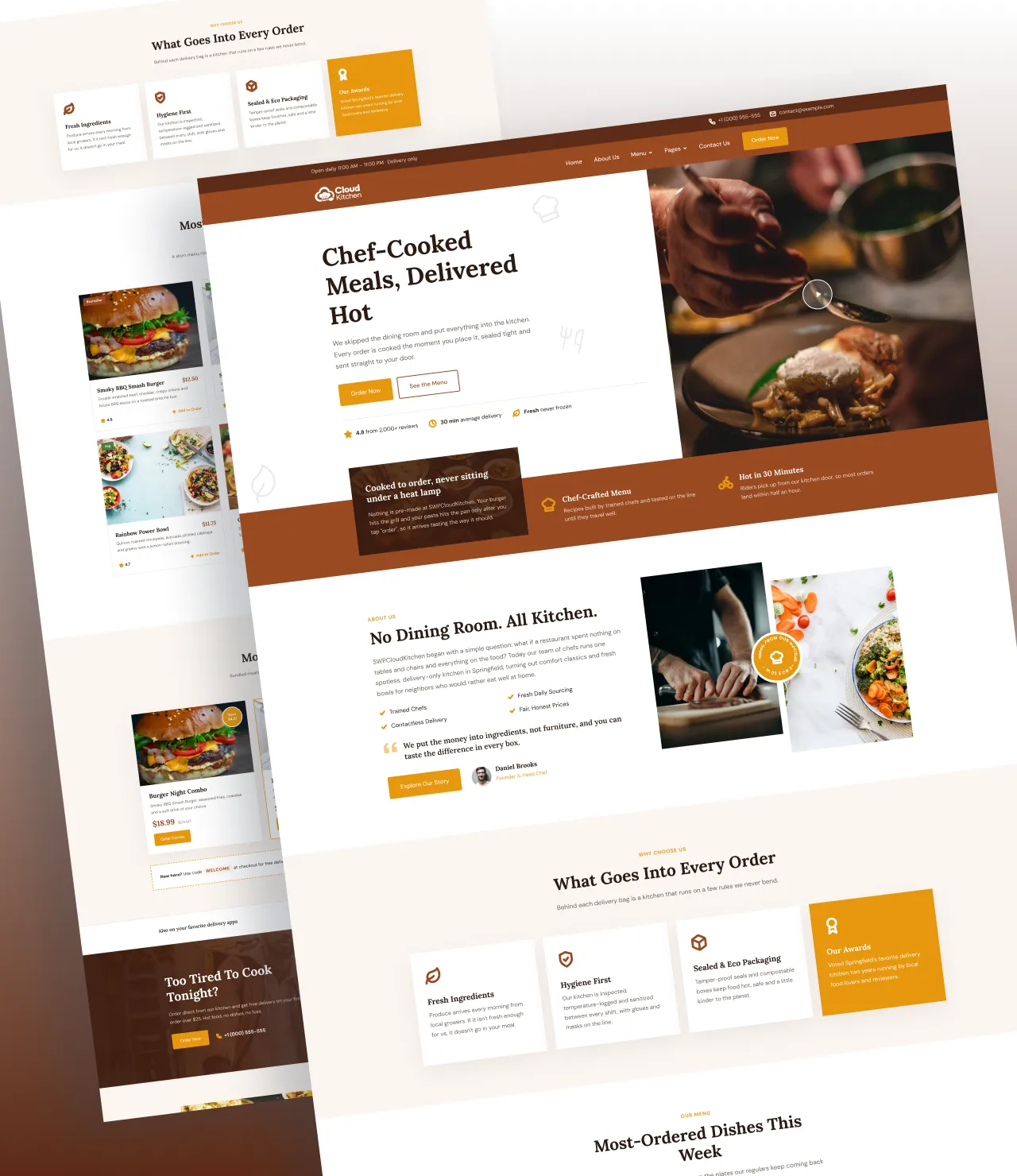
SWP Cloud Kitchen Pro is a fast, fully responsive cloud kitchen WordPress theme for delivery-only restaurants, ghost kitchens and virtual food brands. It gives your kitchen a warm, appetising website that shows your menu, pushes your best combos and turns hungry visitors into orders, without hiring a developer.
A cloud kitchen has no dining room, so your website is your storefront. This theme was designed for that reality. Every section points visitors toward one action: placing an order, by phone, by delivery app or straight from your own site.
Why Choose This Cloud Kitchen WordPress Theme?
Most restaurant WordPress themes are built for sit-down venues, with table reservations and floor plans you will never use. SWP Cloud Kitchen Pro is built for food delivery businesses. It highlights delivery times, ratings, combo savings and the apps you sell on, which are the things a delivery customer actually checks before ordering.
The design uses a rich brown and amber palette with elegant Lora headings and clean DM Sans body text. Food photography sits at the centre of every layout, so your dishes do the selling.
Homepage Sections Made for Food Delivery
The homepage ships with twelve ready-made sections. You can reorder, hide or edit each one from the WordPress Customizer:
- Hero section with a bold headline, two call-to-action buttons, trust points (rating, average delivery time, freshness) and a video play button that opens YouTube, Vimeo or MP4 in a lightbox.
- Feature band with a welcome card and icon features such as “Chef-Crafted Menu” and “Hot in 30 Minutes”.
- About Us with your story, a checklist, a founder quote and a spinning “Fresh From Our Kitchen” badge.
- Why Choose Us cards for fresh ingredients, hygiene, eco packaging and awards.
- Food menu with dish photos, prices, badges (Bestseller, Veg, Chef’s Pick), ratings and “Add to Order” links, plus optional category filter tabs.
- Offers & combos with savings badges, strike-through prices and a promo-code strip.
- Delivery partners strip for Uber Eats, DoorDash, Grubhub and any other app.
- Order CTA with a background photo, phone number and animated stats.
- Catering & bulk orders for office lunches, parties and scheduled deliveries.
- Testimonials carousel with star ratings, photos, autoplay, swipe and keyboard support.
- FAQ accordion with automatic FAQ schema for rich search results.
- App download & newsletter band with App Store and Google Play buttons.
Complete Inner Pages, Ready on Day One
The theme includes eight inner page templates: About, Menu, Offers, Catering, Reviews, FAQ, Contact and Blog. Each page has its own banner and its own copy of the sections it uses, so you can write different headings on the Menu page than on the homepage. The Menu page opens filter tabs directly from links such as /menu/#menu-burgers, and the header dropdown uses those links out of the box.
The Contact page combines your address, phone, email and kitchen hours with a styled Contact Form 7 form and a Google Map. A separate newsletter form collects subscribers, and both work even before Contact Form 7 is installed.
A Popup That Grows Your Orders
A built-in offer popup appears when a visitor scrolls 50% of the homepage. It shows a promo code that customers tap to copy, plus “Order Now” and “View Combos” buttons. Every detail is adjustable in the Customizer: the pages it shows on, scroll depth, delay or exit intent, how often it repeats, mobile visibility, image position, entrance animation, colours, width and corner radius. You can also swap the buttons for a newsletter or contact form.
Full Control Without Code
Every heading, paragraph, image, button and link is editable in the Kirki-powered Customizer. You can also change the colour palette, heading and body fonts, font sizes, container width, logo heights and button radius. Separate logo settings cover the header, sticky header, footer and preloader. Internal links fix themselves: a “#contact” button scrolls in place where the contact section exists and opens the Contact page everywhere else.
Fast, Mobile-Friendly and SEO-Ready
Speed matters when people are hungry. SWP Cloud Kitchen Pro loads no jQuery and no slider library on the front end, and uses one small deferred script. Icons are inline SVG, demo images are WebP, the hero image is preloaded, and Contact Form 7 files load only on pages that show a form. A Speed & Performance panel removes emoji scripts, embeds, unused block CSS and head clutter with one switch each. The mobile menu even works with JavaScript turned off.
For search engines, the theme outputs Restaurant, FAQPage and BreadcrumbList structured data and clean meta descriptions. The meta descriptions switch off automatically when Yoast, Rank Math or another SEO plugin is active.
One-Click Demo Import
The setup wizard installs Kirki and Contact Form 7, then imports the full demo in one click. That includes all pages, blog posts, menus, images, forms and Customizer settings. Replace the photos and prices with your own, and your cloud kitchen website is ready to launch.
Launch your delivery brand with a cloud kitchen WordPress theme that looks as good as your food tastes. Get SWP Cloud Kitchen Pro today.
Who can use this cloud kitchen WordPress theme?
Any food business that sells mainly through delivery, pickup or pre-orders.
- Cloud kitchens and ghost kitchens running one or several delivery-only brands
- Virtual restaurant brands that sell through Uber Eats, DoorDash or Grubhub and want their own website
- Restaurants moving to delivery and takeaway that no longer need table booking features
- Meal-prep and healthy bowl services selling weekly bundles and subscriptions
- Catering companies taking office lunch, party and bulk orders
- Home chefs and home bakers building a small, professional online brand
- Pizza, burger, pasta and fast-casual outlets with a short, photo-led menu
- Food truck and street food businesses that take pre-orders and pickups
- Bakeries, dessert and breakfast kitchens promoting daily specials and combos
- Food delivery startups and franchise groups launching new kitchen locations
- Web designers and agencies building restaurant and food delivery websites for clients
What you get
10 templates, ready to edit
All of them install with the demo content, and all of them are patterns rather than locked layouts.
Home
About
Services
Service detail
Blog
Single Post Page
Contact
FAQ
404 Error
Archive
Compatibility
The technical details
| Current version | 1.0 |
|---|---|
| Last updated | Oct 05, 2026 |
| WordPress | 6.2.2 + |
| PHP | 7.4+ |
| Theme type | WordPress Customizer |
| Works with | Kirki, Rank Math, Yoast, WPML, Polylang, Contact Form 7, Light Speed Cache |
| Browsers | Chrome, Safari, Firefox, Edge - current and previous versions. |
| Languages | POT file included, RTL stylesheets, translation ready. |
| Download size | 3 MB |
| Licence | GPL v2 or later |
Changelog
Recent updates
Every fix and addition since release, free for anyone who owns it.
Oct 05, 2026
1.0
Initial Release
New Product Release
Reviews
What buyers say about Cloud Kitchen WordPress Theme
No reviews yet — be the first to say how it went.
Only customers who have bought this product can review it.
Before you buy
Questions about Cloud Kitchen WordPress Theme
What is a cloud kitchen WordPress theme?
It is a WordPress theme designed for delivery-only food businesses. Instead of table reservations, it focuses on your menu, combo offers, delivery times, delivery apps, catering and fast online ordering.
Do I need coding skills to use SWP Cloud Kitchen Pro?
No. Every section, text, image, colour, font and link is edited in the WordPress Customizer with live preview, and the one-click demo importer builds the full site for you.
Which plugins does the theme need?
Kirki (for the Customizer options) and Contact Form 7 (for the contact, catering and newsletter forms). The setup wizard installs and activates both for you.
Can customers order food directly from the website?
The theme links every "Order Now” and "Add to Order” button to the page, phone number or delivery app of your choice. You can point the buttons at WooCommerce, an online ordering plugin, or your Uber Eats, DoorDash or Grubhub store.
Is the theme mobile-friendly?
Yes. Every section is fully responsive and tested from large desktops down to 390px phones. The mobile menu works even without JavaScript.
Will the theme slow down my site?
No. It uses no jQuery on the front end, one small deferred script, inline SVG icons, WebP images and hero image preloading. A Speed & Performance panel lets you remove extra WordPress scripts with one click.
Is SWP Cloud Kitchen Pro SEO-friendly?
Yes. It outputs Restaurant, FAQ Page and Breadcrumb List schema, clean heading structure and meta descriptions, and it works with Yoast SEO, Rank Math and other SEO plugins.
Can I change the colours and fonts to match my brand?
Yes. Eleven colour settings and ten heading plus ten body Google Fonts are available, along with font size, container width and button radius controls.
How does the popup work?
By default it appears once per session when a visitor scrolls halfway down the homepage and shows a tap-to-copy promo code. You can change the trigger, frequency, pages, content, image, animation and colours.
Can I use the theme for more than one food brand?
Yes. You can run one site per brand, or use the menu categories, inner pages and blog to present several virtual brands from the same kitchen.
You might also consider
Related products
Still deciding
Click through the demo first
The preview is the complete theme, on the same content the importer installs.
support@scintillawpthemes.com